UEQ - the user experience questionnaire

Measure the User Experience with the UEQ Survey

Quickly and reliably measure the user experience of interactive products with the User Experience Questionnaire (UEQ).

Immobilienscout 24 ist begeisterter easyfeedback Nutzer

“Identifying user needs is at the heart of our business. easyfeedback has been helping us with this task for several years now. We particularly appreciate its intuitive usability and professional support.”

Franziska Becker
Guild Lead User Experience Research
TUI ist begeisterter easyfeedback Nutzer

“We use easyfeedback for internal and external surveys—it’s fast, convenient, and easy! The uncomplicated and friendly support puts a smile on our faces, and we are delighted with the continuous development of the platform.”

Jennifer Fischer
Guest & Competitor Insights Analyst

Can user experience be optimized through surveys?

Yes, because what makes a good user experience?

Usefulness, aesthetics, and stability. If all three factors are present, this leads to a high user experience.

Regular surveys must be conducted so that the user experience can be continuously tested and improved.

The UEQ (User Experience Questionnaire) is an established survey for obtaining feedback from users of software/tools.

With its 26 items, the UEQ covers six factors: attractiveness, efficiency, predictability, stimulation, transparency, and originality. These factors help to reliably test the software/tool for quality and user experience.

easyfeedback offers you this user experience questionnaire free of charge and ready for immediate use. Simply register and start collecting user experience data using the UEQ.

And if you find the questionnaire too long for your users, you can also use the shorter version of the UEQ. Although this cannot measure the UX in as much detail, it is shorter and more flexible in its application.

Our survey tool offers both versions of the UEQ for your survey. Simply select the questionnaire you need to optimize your software/tool.

Contents of the template:

  • Survey on attractiveness
  • Survey on transparency
  • Survey on efficiency
  • Survey on predictability
  • Survey on stimulation
  • Survey on originality

Objectives of the survey:

  • Gather (multilingual) user experiences
  • Optimize interactive product based on user feedback
  • Benchmarking

Helpful features for the survey:

  • Survey options: Anonymous, partially anonymous, personalized
  • Invitation options: Link, email, QR code, and more
  • Segment analysis based on survey groups or response behavior
DSGVO-konforme Online-Umfragen

Data protection „made in Germany“ (GDPR)

Anonyme Teilnahme an Umfragen

Anonymity function for honest feedback

Frequently asked questions about the UEQ

The User Experience Questionnaire (UEQ) is a standardized questionnaire that is widely used to evaluate interactive products such as software applications or online tools in terms of their quality and the user experience.

This questionnaire is based on 26 items that cover various aspects of the user experience.

By using the UEQ, companies can gain valuable insights into how their users perceive and experience their products, as well as their level of satisfaction.

The questions in the questionnaire cover various dimensions of the user experience, including attractiveness, perspicuity, stimulation, efficiency, dependability, and originality.

In this way, the UEQ enables a comprehensive evaluation of the user experience and helps companies identify weaknesses and recognize potential for improvement.

Using a standardized questionnaire such as the UEQ offers the advantage that the results are objective and comparable.

This enables companies to evaluate their products against industry standards or competing products and take targeted measures to improve the user experience.

Ultimately, a positive user experience contributes significantly to customer satisfaction and can help increase a company’s competitiveness and success.

The User Experience Questionnaire (UEQ) and the UEQ Short are both instruments for measuring user experience, but they differ in scope and level of detail.

Here are the key differences:

UEQ

  • Scope: Contains 26 items (questions) divided into six dimensions: Attractiveness, Perspicuity, Efficiency, Dependability, Stimulation, and Novelty.
  • Level of detail: Provides a comprehensive and detailed evaluation of the user experience.
  • Application: Suitable for extensive studies and projects where a detailed analysis of the user experience is required.


UEQ Short

  • Scope: Contains only 8 items, divided into two dimensions: Pragmatic Quality and Hedonic Quality.
  • Level of detail: Provides a quick and broad assessment of the user experience.
  • Application: Suitable for quick evaluations and projects where the time required for the survey should be kept to a minimum.

The User Experience Questionnaire (UEQ) and the System Usability Scale (SUS) are both widely used methods for evaluating the user experience and usability of systems and products.

  • UEQ: Provides a comprehensive evaluation of the overall user experience, making it ideal for in-depth analyses.


  • SUS: Provides a quick and simple assessment of usability, making it ideal for rapid testing and comparisons.


Depending on the objective of the evaluation, either the UEQ or the SUS can be selected. The UEQ is particularly suitable when both the pragmatic and hedonic quality of a product are to be evaluated, while the SUS is ideal for a quick and focused assessment of usability.

AttrakDiff and the UEQ (User Experience Questionnaire) are both instruments for evaluating user experience, but they differ in their approach and scope.

  • AttrakDiff: Provides a differentiated assessment of pragmatic and hedonic aspects of user experience. It is ideal for targeted analyses and studies where distinguishing between functional and emotional aspects is important.


  • UEQ: Provides a comprehensive assessment of user experience across six dimensions. It is ideal for detailed analyses that cover both functional and emotional aspects, as well as for research and development.


Both questionnaires have their own strengths and can be selected depending on the objective of the evaluation.

Since the user experience is based on subjective perception, it can often be difficult to obtain consistent feedback that is also comparable.

With the UEQ, you have a standardized and recognized tool for measuring User Experience that allows you to assess and compare the subjective user experience when using an interactive product across 6 facets.

The questionnaire is easy to understand and measures not only usability but also User Experience. Evaluation and interpretation are straightforward thanks to the 26 pairs of adjectives (question type: semantic differential), making the UEQ well suited for benchmarking.

By using the UEQ, companies can obtain valuable feedback from their users, enabling them to continuously improve their products and deliver an outstanding user experience.


What does the UEQ measure?

The User Experience Questionnaire (UEQ) is a valuable tool for evaluating the quality and user experience of interactive products.

Users’ subjective perceptions are often difficult to quantify, and obtaining comparable feedback can be challenging.

The UEQ provides you with a standardized and recognized tool for capturing and comparing the subjective user experience when using an interactive product.

This is done using 26 items covering six facets of the user experience: Attractiveness, Efficiency, Predictability, Stimulation, Perspicuity, and Novelty.

The questionnaire is easy to understand and measures not only the usability but also the User Experience of the product.

Evaluation and interpretation are based on 26 pairs of adjectives using a semantic differential. This format makes the questionnaire easy to use and well suited for benchmarking purposes.

By applying the UEQ, you can gain valuable insights into the strengths and weaknesses of your interactive product and take targeted measures to improve the user experience.

This can help to increase user satisfaction, enhance the attractiveness of your product, and ultimately support the success of your company.

The User Experience Questionnaire (UEQ) comprises six dimensions, each of which measures different aspects of the user experience.

Here are the six dimensions of the UEQ in detail:

1. Dimension: Attractiveness

  • Description: Overall impression of the product. This dimension assesses how appealing and pleasant the product appears to the user.
  • Example questions: “The product is pleasant” vs. “The product is unpleasant.”


2. Dimension: Perspicuity

  • Description: Ease of understanding and use. This dimension measures how easily the user can understand and operate the product.
  • Example questions: “The product is easy to understand” vs. “The product is confusing.”


3. Dimension: Efficiency

  • Description: Speed and effectiveness. This dimension assesses how quickly and efficiently the user can achieve their goals with the product.
  • Example questions: “The product is fast” vs. “The product is slow.”


4. Dimension: Dependability

  • Description: Predictability and control. This dimension measures how reliable and secure the user perceives the product to be.
  • Example questions: “The product is predictable” vs. “The product is unreliable.”


5. Dimension: Stimulation

  • Description: Motivation and inspiration. This dimension assesses how exciting and motivating the product feels to the user.
  • Example questions: “The product is exciting” vs. “The product is boring.”


6. Dimension: Novelty

  • Description: Innovation and creativity. This dimension measures how innovative and creative the user perceives the product to be.
  • Example questions: “The product is innovative” vs. “The product is conservative.”

The evaluation of the User Experience Questionnaire (UEQ) is carried out in several steps and can be performed either manually or with the help of specialized software.

Here is an overview of how the evaluation typically works:

1. Step: Data collection

  • Questionnaire distribution: The UEQ is presented to users who evaluate their experiences with the product.
  • Response scale: Ratings are given on a seven-point Likert scale ranging from -3 (very negative) to +3 (very positive).


2. Step: Data cleaning

  • Verification: Ensuring that all questions have been answered and that the responses are valid.


3. Step: Calculation of mean values

  • Dimensions: The UEQ comprises six dimensions:
      • Attractiveness
      • Perspicuity
      • Efficiency
      • Dependability
      • Stimulation
      • Novelty


  • Mean values: The mean of the responses is calculated for each dimension.


4. Step: Standard deviation and confidence intervals

  • Standard deviation: Calculation of the distribution of responses to determine the reliability of the mean values.
  • Confidence intervals: Determination of the confidence intervals for the mean values to assess the statistical reliability of the results.


5. Step: Interpretation of the results

  • Benchmarking: Comparison of the results with reference values from previous studies or industry standards.
  • Analysis: Identification of the product’s strengths and weaknesses based on the dimensions.


6. Step: Presentation of the results

  • Charts and graphs: Visualization of the results in the form of bar charts or radar charts to illustrate the user experience clearly.
  • Report: Preparation of a comprehensive report summarizing the results and providing recommendations for action.


Example of a UEQ Questionnaire Evaluation

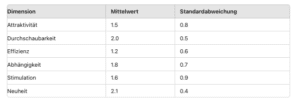
Let’s assume that we have calculated the following mean values and standard deviations for the dimensions:

Example of a UEQ questionnaire evaluation

These values could be visualized in a bar chart to illustrate the user experience across the different dimensions.

Software support

Various tools and software packages can be used to evaluate the UEQ, including:

  • Microsoft Excel: For simple calculations and chart creation.
  • SPSS or R: For statistical analyses and advanced evaluations.
  • UEQ Data Analysis Tool: A tool specifically developed for the simple and quick evaluation of the UEQ.


These steps help you evaluate the user experience in a structured and well-founded manner, which in turn provides valuable insights for product development and optimization.

easyfeedback can be helpful as a UEQ tool (User Experience Questionnaire) in various ways to comprehensively evaluate the user experience.

Here are some ways easyfeedback can support you:

1. Creating and customizing questionnaires

  • Easy creation: With easyfeedback’s drag & drop editor, you can quickly and intuitively create your UEQ questionnaire. You can add the 26 UEQ items and customize them as needed.
  • Individual design: Design welcome and completion pages, add multiple pages, and integrate images, videos, and audio files to make the questionnaire more engaging.


2. Versatile invitation options

  • Invitation via link: Simply send the questionnaire to your participants via a link.
  • QR code: Automatically generate a QR code that participants can scan to access the questionnaire.
  • Email invitations: Use easyfeedback’s email invitation tool to reach specific participants.
  • Embedding on your website: Embed the questionnaire directly on your website to collect feedback without IT support.


3. Live evaluation and real-time data

  • Instant results: See participants’ responses live and in real time as soon as they complete the questionnaire.
  • Comprehensive statistics: Get data on visitors, participants, and dropouts, and analyze responses in charts and data tables.


4. Segmentation and filters

  • Segment participant groups: Use the filter settings to segment results by different participant groups and gain deeper insights.
  • Create comparisons: Compare different target groups to see how each group responded to the questions.


5. Detailed analysis

  • Results presentation: Responses are displayed in clear charts and tables, making interpretation easier.
  • Export options: Export the data for further analysis in other software tools such as Excel, SPSS, or R.

More customer survey templates

System Usability Scale Questionnaire Template

System Usability Scale

Survey template details

Survey Template: Website-Feedback

Website Feedback

Survey template details

Survey Template: Product satisfaction

Product Satisfaction

Survey template details

Survey-Template-Measure Customer Satisfaction

Customer Satisfaction

Survey template details

Survey Template: Customer Cancellation

Customer Cancellation

Survey template details

Explore all survey templates  

You are in professional company

Immoscout 24 Logo
Tui Logo
Porsche Logo
Lufthansa Logo
Jaegermeister Logo

Over 740,000 participants in easyfeedback surveys every month

Result

STUDIO

The performance add-on for your analysis

easyfeedback Result Studio 2