

“Identifying user needs is at the heart of our business. easyfeedback has been helping us with this task for several years now. We particularly appreciate its intuitive usability and professional support.”

“We use easyfeedback for internal and external surveys—it’s fast, convenient, and easy! The uncomplicated and friendly support puts a smile on our faces, and we are delighted with the continuous development of the platform.”
Your online contact form is more than just a way to receive inquiries — it’s an essential part of your brand’s public image.
With a well-designed form, create a welcoming environment for communication throughout the customer lifecycle and leave a lasting positive impression on your customers.
A custom-designed contact form not only strengthens your brand perception but also streamlines the processing of inquiries.
Through targeted segmentation by type, purpose, and responsibility, inquiries can be processed faster and more accurately, which delights your customers.
With easyfeedback, you can effortlessly create a custom, GDPR-compliant contact form that can be expanded to include an online questionnaire.
This allows you to optimize your communication while benefiting from valuable data analytics that help you further improve your processes.
Contents of the template:
Objectives of the survey:
Helpful features for the survey:

Data protection „made in Germany“ (GDPR)

Anonymity function for honest feedback
An online contact form is an electronic application in which data is entered through predefined fields for collection and further processing.
Typical information requested in such forms includes a name, email address, telephone number, and a message or inquiry.
This digital form is often embedded on websites, enabling users to contact the website operator—whether an individual or a company—more easily and submit their concerns or questions.
These forms provide website visitors with a convenient way to communicate with a company without having to write an email or call a telephone number.
This makes them an effective tool for customer communication, allowing companies to manage inquiries efficiently and respond quickly to customers’ needs.
In addition, online contact forms can include extra functions such as automatic notifications or integrations with customer management systems to optimize inquiry processing and ensure that no messages go unanswered.
These features make online contact forms an indispensable tool for companies to improve customer service and facilitate interaction with their customers.
An online questionnaire can be customized, including to match your company’s corporate design. This ensures strong brand recognition and makes your contact form stand out from others.
Another advantage is that you can share the online questionnaire link across all kinds of channels without having to redesign the contact form separately for each channel.
For example, would you like to use the contact form in a social media post?
You can simply include the contact form link directly in the post.
Another example is integrating the contact form via a link in a shared company presentation.
Readers can then click the link when needed, and the contact form opens in their web browser as a modern online questionnaire.
It is also possible to integrate the online questionnaire with your CRM system, allowing collected data to be transferred automatically.
Online questionnaires with easyfeedback, for example, comply with GDPR data protection requirements. You therefore do not need to worry further about the data protection of the contact form you provide.
Online contact forms are used for digital communication between website visitors and companies or organizations.
They provide a central interface for efficiently collecting inquiries, feedback, or information.
Depending on the goal, information requirements, and user-friendliness, contact forms can generally be divided into three main types:
Standard contact form
The standard form is the most common type and generally includes all basic fields required for initial contact.
These typically include:
This form is frequently used on contact pages or in the footer of company websites.
Its purpose is to offer users a simple way to contact the company directly—whether they have questions, feedback, or concerns about a product or service.
Minimalist contact form
The minimalist contact form is limited to the essentials—usually only:
This option is particularly common for newsletter sign-ups, lead generation, or the download of content such as white papers, checklists, or e-books.
It is often supplemented with one or more checkboxes through which users must give their consent to the processing of personal data and to receiving further marketing information, such as email newsletters—especially in view of data protection requirements such as the GDPR.
The advantage is the low entry barrier: the less information users are asked to provide, the more likely they are to complete the form.
Multi-step contact form
The multi-step form extends the standard form with additional questions, which can be completed step by step or across multiple pages.
Its purpose is to collect more context without overwhelming the user.
Typical additional information may include:
These forms are frequently used in the B2B sector, for example for inquiries about services, software solutions, or tailored offers.
The structured collection of information makes it possible to generate qualified leads and forward them directly to the appropriate contacts within the company.
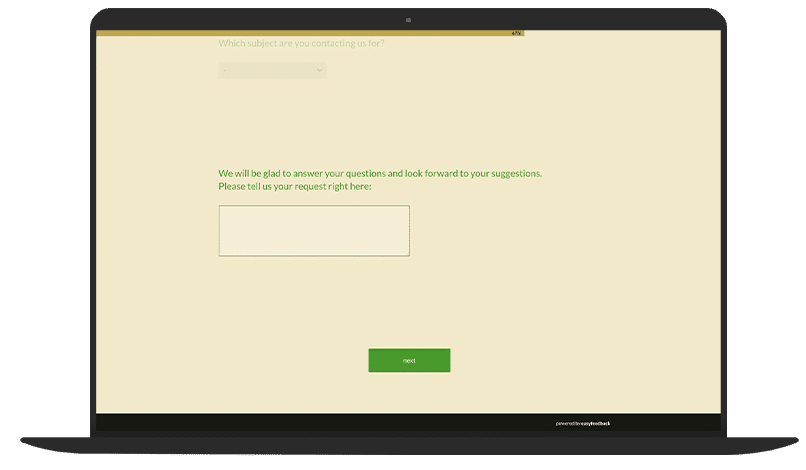
You can offer a contact form as a questionnaire, for example, on your website or within your tool.
You can adapt the questions to suit your requirements and request additional information that is relevant to your company.
These forms allow customers or users to contact you quickly and easily or provide feedback.
You could also save the contact form as an image, place it in your newsletter, for example, and add a link to it.
When readers click on the image, they are redirected to the contact form.
This provides another way to make interaction with customers easier and encourage them to get in touch without having to leave the newsletter.
You can also include a link to your online contact form in social media posts.
By directing followers straight to your contact form, you give them the opportunity to respond quickly to your posts and contact you.
This can help increase social media engagement and make it easier for customers to communicate with you, regardless of the platform they prefer.
If you want to design a contact form while taking data protection into account, you should consider the following points:
1. Point: Provide data protection information
2. Point: Obtain consent
3. Point: Ensure data security
4. Point: Data minimization
5. Point: Observe retention periods
6. Point: User rights
Sample text for data protection in a contact form
Data protection
Your data is safe with us. We collect only the information necessary to process your inquiry. You can find further details about how we process your data in our privacy policy.
Consent to data processing
I agree to the processing of my data in accordance with the privacy policy.
Here are some tips for designing an effective contact form:
1. Tip: Keep it simple and clear
Keep the form short and clearly structured. Use only the necessary fields.
2. Tip: Use clear labels
Use clear, easy-to-understand field labels and placeholder text.
3. Tip: Optimize for mobile
Ensure that the form works well on mobile devices.
4. Tip: Provide visual feedback
Give visual feedback when fields have been completed correctly or incorrectly.
5. Tip: Display error messages
Place helpful error messages directly next to the relevant fields.
6. Tip: Mark required fields
Clearly mark required fields, for example with an asterisk (*).
7. Tip: Use protective measures
Integrate anti-spam measures, such as CAPTCHAs or honeypots.
8. Tip: Data protection
Provide information about data protection and how the data will be used.
9. Tip: Call to action
Use a prominent and clear call-to-action button, such as “Send” or “Submit.”
10. Tip: Confirmation
Provide confirmation after submission, for example through a thank-you page or a confirmation email.
A good contact form is user-friendly, visually appealing, and efficient.
Here are the key elements of a well-designed contact form:
1. Element: Heading and introduction
2. Element: Structure and layout
3. Element: Fields
4. Element: Required fields
5. Element: Error messages and feedback
6. Element: Call to action (CTA)
7. Element: Data protection and security
8. Element: Confirmation
9. Element: Design and branding
1. Basic fields:
2. Optional but often useful fields:
3. User-friendliness:
4. Design and layout:
5. Technical aspects:
Here is an example of an effective contact form that you can use on your website.
This form includes all essential elements for user-friendly, data protection-compliant communication.
—
Contact form
We look forward to hearing from you!
Please complete the form below so that we can assist you as quickly as possible.
Name:
[Text field] (Required field)
Email address:
[Text field] (Required field)
Subject:
[Text field] (Optional)
Telephone number:
[Text field] (Optional)
Message:
[Text area] (Required field)
Company/organization:
[Text field] (Optional)
—
Consent to data processing:
[ ] *I agree to the processing of my data in accordance with the [Privacy Policy]. (Required field)
[Button: Send message]
—
Confirmation message:
Thank you for your message!
We have received your inquiry and will get back to you as soon as possible.
You can create your own contact form as an online questionnaire with us in just five steps:
Step 1: Register for free for the easyfeedback survey tool.
Step 2: Start with our template or create your own contact form using our questionnaire editor.
Step 3: Select the question types you need and include an actively selectable privacy notice.
Step 4: Give your online contact form your own visual touch.
Step 5: Publish the questionnaire and embed the online contact form wherever you need it—via iframe, link, or our website integration.
Can I connect the digital contact form with other tools?
Yes, this is possible.
Online contact forms with easyfeedback can be connected via the Zapier web application to more than 5,000 popular apps, including CRM, marketing, office, and other tools. In addition to easyfeedback, you will need a Zapier account.
You can then create automated workflows in Zapier to start transferring data from your form and trigger possible follow-up actions.
You can find more information about the options for integrating easyfeedback with other tools here.
What can I customize in the contact form template?
You can customize every aspect of our sample template to suit your needs.
Replace existing questions and fields or add new ones, adapt the contact form template’s layout to match your company’s colors and fonts, for example, or redirect people looking to contact you to an external page of your choice after they submit the form.
Our contact form template simply serves as inspiration for how you can design your online contact form with easyfeedback.
Give it a try!
Are online contact forms with easyfeedback GDPR-compliant?
Yes, online contact forms with easyfeedback are data protection compliant.
Not only do we offer the option of designing GDPR-compliant contact forms—for example, with a customized privacy notice and a consent checkbox—but collecting the data required for the contact form is also always data protection compliant with easyfeedback.
Thanks to our technical measures, such as data encryption and ISO 27001 certification for our German servers, we also offer maximum security for survey participation.
You can rely on our data protection practices.
Would you like to learn more?
Click here.