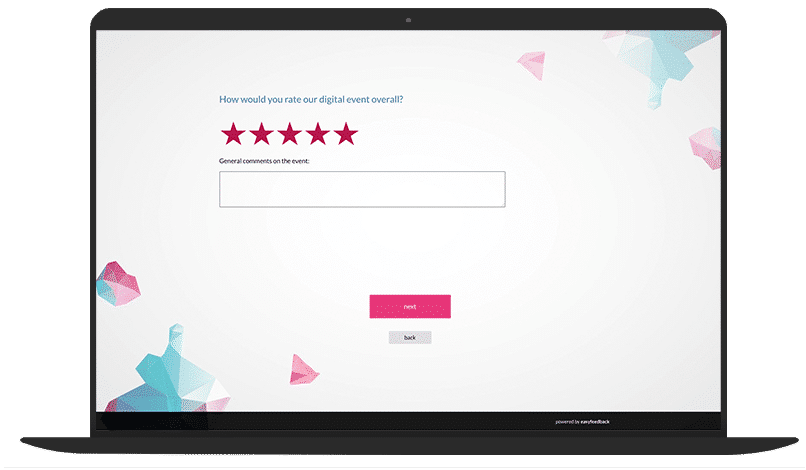
Collect real-time feedback for your digital event via a survey

Get feedback to your digital event

Easily find out how satisfied your participants were with your interactive event. Use this valuable feedback to make targeted improvements and make future events even more successful. Feedback helps you exceed expectations and improve quality.

Immobilienscout 24 ist begeisterter easyfeedback Nutzer

“Identifying user needs is at the heart of our business. easyfeedback has been helping us with this task for several years now. We particularly appreciate its intuitive usability and professional support.”

Franziska Becker
Guild Lead User Experience Research
TUI ist begeisterter easyfeedback Nutzer

“We use easyfeedback for internal and external surveys—it’s fast, convenient, and easy! The uncomplicated and friendly support puts a smile on our faces, and we are delighted with the continuous development of the platform.”

Jennifer Fischer
Guest & Competitor Insights Analyst

Why collect feedback on the online event?

It is not only the pandemic but also the numerous advantages that are driving the trend toward digital events and seminars.

The ability to hold events from anywhere and the savings on venue and catering costs associated with in-person events are making interactive online events increasingly popular.

Added to this are the reduced planning effort, more efficient execution, and the ability to flexibly scale the number of participants — all of which increase their appeal.

But regardless of whether it’s an in-person or online event, one thing remains essential: gathering feedback.

Only through feedback can you determine whether participants’ expectations were met and how the event can be further optimized.

This is how you create events that inspire and achieve lasting success.

Contents of the template:

  • Feedback on the digital event
  • Evaluation of the speakers/moderators/event organizers
  • Question about the reason for attending
  • Asking what participants liked and what they didn’t like as much

Objectives of the survey:

  • Receive feedback on the virtual event
  • Learn why participants attended
  • Understand participants’ expectations
  • Optimize the event based on participant feedback

Helpful features for the survey:

  • Survey options: Anonymous, partially anonymous, personalized
  • Invitation options: Link, email, QR code, and more
  • AI analysis of results, including recommendations for action
DSGVO-konforme Online-Umfragen

Data protection „made in Germany“ (GDPR)

Anonyme Teilnahme an Umfragen

Anonymity function for honest feedback

Frequently asked questions about online events

An online event is a virtual event that takes place entirely over the internet, enabling people to come together regardless of their geographical location.

The only requirement for participation is a stable internet connection, removing barriers such as travel time, costs, and physical distance.

Online events can take many forms, which vary greatly depending on their purpose and number of participants:

  • Webinars are often one-hour presentations, talks, or workshops delivered in real time. They make it possible to share expert knowledge in a concise, interactive format, usually followed by a Q&A session or discussion.


  • Virtual conferences generally run over several days and include different sessions, keynotes, and breakout rooms—all accessible digitally. They facilitate the exchange of ideas among professionals, networking, and the presentation of new developments in a digital setting.


  • Online workshops are characterized by a particularly high level of interactivity. Participants can communicate directly with facilitators and one another, complete exercises, or collaborate on projects—all in real time.


  • Live streams broadcast events such as product launches, concerts, or panel discussions directly online. Viewers can usually provide live feedback through chats or social media and actively participate even when physically apart.


  • Online training courses offer structured learning programs and training that can be accessed flexibly. Some courses take place live, while others are offered as on-demand courses that participants can complete at their own pace.


The main advantage of online events lies in their flexibility and extensive reach. They enable participation from anywhere in the world—whether from a home office, while traveling, or from another country.

This not only saves travel time and accommodation costs, but also enables a much larger and more diverse participant base.

In addition, online events promote new forms of collaboration and knowledge sharing. They offer interactive tools such as chats, virtual whiteboards, and breakout sessions, which strengthen communication and networking despite physical distance.

This makes learning, networking, and collaborative problem-solving location-independent, time-saving, and highly efficient.

Digital events offer a wide range of advantages, but also present some challenges.

Here are the key advantages and disadvantages:

Advantages

Advantage 1: Cost Savings

  • Travel costs: No expenses for flights, hotels, or meals.
  • Venue: No rental costs for physical event venues.


Advantage 2: Accessibility and Reach

  • Global audience: Participants can join from all over the world, increasing reach.
  • Accessibility: People with mobility limitations can participate more easily.


Advantage 3: Flexibility and Convenience

  • Time flexibility: Participants can join from anywhere, often even asynchronously through recordings.
  • Convenience: No travel is required, making participation easier and less stressful.


Advantage 4: Environmental Friendliness

  • Lower CO2 emissions: Eliminating travel and reducing paper consumption helps protect the environment.


Advantage 5: Interactive Opportunities

  • Easy interaction: Chat functions, polls, and Q&A sessions can be easily integrated.
  • Data analysis: Participant data and feedback can be easily collected and evaluated.


Disadvantages

Disadvantage 1: Technical Challenges

  • Technical issues: Connection problems, software errors, or hardware failures can disrupt the event.
  • Technical knowledge: Participants and organizers need technical knowledge to use the platform effectively.


Disadvantage 2: Less Personal Interaction

  • Networking: Direct personal contact and networking opportunities are limited.
  • Body language: Nonverbal communication and personal interactions are limited.


Disadvantage 3: Data Protection and Security

  • Security risks: Higher risk of cyberattacks and data breaches.
  • Confidentiality: It is more difficult to protect confidential information.


Disadvantage 4: Limited Experience Quality

  • Experience: The personal experience and atmosphere of an in-person event are difficult to reproduce digitally.
  • Technical barriers: Participants may encounter technical difficulties that could affect their experience.

A successful online event requires careful planning and organization.

Here is a detailed guide to ensure your event runs smoothly and provides a positive experience for all participants:

Step 1: Define Objectives and Plan

  • Define objectives: Clarify the event’s main objectives, such as sharing information, networking, or professional development.
  • Define the target audience: Identify your target audience and its needs.


Step 2: Format and Structure

  • Event format: Decide on the format, such as a webinar, workshop, conference, or panel discussion.
  • Create an agenda: Develop a detailed agenda with timings for presentations, discussions, and breaks.


Step 3: Technical Platform

  • Select a platform: Choose a suitable platform, such as Zoom, Microsoft Teams, or Webex, based on the requirements and number of participants.
  • Check technical requirements: Ensure all technical requirements are met, such as bandwidth, software, and hardware.


Step 4: Content and Speakers

  • Prepare content: Create engaging, relevant content tailored to your target audience’s interests.
  • Invite speakers: Select and invite qualified speakers who are experts in their field.


Step 5: Marketing and Registration

  • Promotion: Use different channels—email, social media, and your website—to promote the event.
  • Registration system: Set up a user-friendly registration system and confirm registrations promptly.


Step 6: Preparation and Test Run

  • Test the technology: Conduct a complete test run to identify and resolve technical issues.
  • Provide materials: Make all necessary materials and information, such as presentations and handouts, available in advance.


Step 7: Deliver the Event

  • Facilitation: Appoint a capable moderator to lead the event and ensure it runs smoothly.
  • Encourage interaction: Use interactive elements such as polls, Q&A sessions, and breakout rooms to increase participant engagement.


Step 8: Follow-Up

  • Collect feedback: Gather feedback from participants to identify the event’s strengths and weaknesses.
  • Share recordings: Provide recordings and materials after the event.
  • Follow up: Send follow-up emails with summaries and additional information.

Digital events can be a great way to connect people, share information, and encourage engagement.

Here are some tips for making digital events successful:

Tips: Planning and Preparation

  • Objective and audience:
    Define clear objectives for your event and understand your audience’s needs and expectations.
  • Platform selection:
    Choose the right platform, such as Zoom, Microsoft Teams, or Webex, that meets your technical requirements and is convenient for participants.
  • Agenda and structure:
    Create a clear agenda with defined time slots for presentations, workshops, breaks, and Q&A sessions.
  • Technical testing:
    Conduct tests in advance to ensure that all technical components work smoothly.


Tips: Content and Interaction

  • Engaging content:
    Ensure that your content is relevant, appealing, and well structured. Use visual aids such as presentations, videos, and infographics.
  • Encourage interactivity:
    Incorporate interactive elements such as polls, Q&A sessions, breakout rooms, and live chats to increase participant engagement.
  • Speakers and moderators:
    Choose knowledgeable and charismatic speakers and moderators who can engage the audience and guide them through the event.


Tips: Follow-Up

  • Collect feedback:
    Gather feedback from participants after the event to identify opportunities for improvement for future events.
  • Follow up:
    Send follow-up emails with summaries, recordings, and additional information to maintain engagement and nurture valuable contacts.


Tips: Creative Ideas

  • Virtual networking opportunities:
    Create spaces for virtual networking, for example through breakout sessions or virtual coffee breaks.
  • Gamification:
    Incorporate game-like elements such as competitions, leaderboards, and rewards to motivate and engage participants.
  • Personalization:
    Use data and analytics to create personalized experiences and provide relevant content for different target audiences.

A checklist for a successful online event can help you remember all important details and ensure your event runs smoothly.

Here is a comprehensive checklist:

A. Before the Event

1. Planning and Concept:

  • Objectives: Define the objectives and purpose of the event.
  • Target audience: Identify your target audience and its needs.
  • Topic and agenda: Choose a relevant topic and create a detailed agenda.


2. Platform and Tools:

  • Platform selection: Choose a suitable platform, such as Zoom, Microsoft Teams, or Webex.
  • Technical requirements: Check the technical requirements for participants and speakers.
  • Registration: Set up a registration system.


3. Speakers and Content:

  • Speaker selection: Choose qualified speakers and coordinate with them.
  • Content creation: Create presentations, videos, and other materials.
  • Rehearsals: Plan rehearsals to test the technical setup and content flow.


4. Marketing and Communication:

  • Invitations: Send invitations and reminders to participants.
  • Website and social media: Promote the event on your website and through social media.
  • Press releases: Draft and distribute press releases, where relevant.


5. Technical Check:

  • Technical test run: Conduct a complete test run of the platform.
  • Backup plans: Create backup plans for technical issues.


6. Participant Communication:

  • Reminder emails: Send reminder emails with all necessary information, including the time, platform, and agenda.
  • Support contact: Ensure participants know how to reach technical support.


7. Preparation:

  • Log in early: Log in early to make sure everything is running smoothly.
  • Technical support: Ensure technical support is available throughout the event.


8. Delivery:

  • Welcome: Welcome participants and explain the event flow.
  • Interaction: Encourage interaction through Q&A sessions, polls, or chat features.
  • Time management: Ensure the schedule is followed.


9. Follow-Up:

  • Thank-you messages: Send thank-you messages to speakers and participants.
  • Feedback: Collect feedback from participants, for example using an online survey tool such as easyfeedback.
  • Recordings: Provide recordings and materials.


10. Analysis and Evaluation:

  • Participant analysis: Analyze participant data and feedback.
  • Report: Create a report on the event results and insights.


11. Follow-Up Actions:

  • Next steps: Plan follow-up actions based on feedback and the event results.
  • Future planning: Use the insights gained to improve future events.

Collecting feedback after a digital event is essential for several important reasons:

Reason 1: Quality Improvement

  • Identify strengths and weaknesses: Feedback helps you understand what worked well and what did not, enabling you to improve future events.
  • Detailed insights: Specific feedback provides deeper insights into areas such as content, technical processes, and interaction.


Reason 2: Participant Satisfaction

  • Participant perspective: Feedback provides a clear picture of how participants experienced the event.
  • Needs and expectations: You learn whether participants’ expectations were met and which needs may have remained unaddressed.


Reason 3: Engagement and Retention

  • Participant retention: Asking for feedback shows participants that their opinions are valued, strengthening engagement and loyalty.
  • Encourage interaction: Regular feedback encourages participants to contribute actively to future events as well.


Reason 4: Improve Content

  • Relevance and currency: Feedback helps you identify which topics and content were especially well received and which areas need further development.
  • Tailor content to the audience: You can better align your content with the specific interests and needs of your target audience.


Reason 5: Technical Optimization

  • Identify technical issues: Feedback on technical aspects such as platform stability, audio quality, and usability helps identify and resolve technical problems.
  • Improve the user experience: You can improve the user experience by optimizing technical processes and features based on feedback.


Reason 6: Evaluate Success

  • Measure achievement of objectives: Feedback enables you to assess whether the event’s objectives were achieved.
  • Define success criteria: You can adjust and refine success criteria and key performance indicators (KPIs) for events based on the feedback received.


Reason 7: Innovation and Creativity

  • New ideas and suggestions: Participant feedback can provide new ideas and inspiration for innovative approaches and formats.
  • Develop best practices: You can identify best practices and incorporate them into future planning.


Reason 8: Transparency and Trust

  • Open communication: Collecting and acting on feedback demonstrates transparency and strengthens participants’ trust in your organization.
  • Enhance reputation: A proactive feedback culture can enhance the reputation of your events and your brand overall.

easyfeedback is primarily designed as a survey and feedback tool, but it can also support various aspects of planning and delivering online events.

Here are some specific ways easyfeedback can help:

Option 1: Before the Event

Participant Surveys

  • Needs assessment: Conduct surveys to identify your target audience’s interests and needs. This helps you select relevant content and topics for the event.
  • Registration and sign-up: Use easyfeedback to create registration forms and collect participant data.


Agenda Feedback

  • Gather input on content: Collect feedback on planned topics and speakers to ensure you offer content that resonates with your target audience.


Option 2: During the Event

Live Feedback

  • Live polls: Integrate live polls during the event to receive immediate participant feedback and adapt the event dynamically.
  • Real-time ratings: Ask participants to rate specific aspects of the event in real time, such as presentations, technology, or interactivity.


Participant Engagement

  • Interactive questions: Use surveys to encourage interaction and increase engagement. This can be particularly useful in workshops or discussion sessions.


Option 3: After the Event

Collect Feedback

  • Event evaluation: Create comprehensive feedback surveys to evaluate the entire event. Ask about satisfaction, strengths, and areas for improvement.
  • Speaker evaluation: Let participants rate speakers to assess the quality of the presentations and talks.


Data Analysis

  • Create reports: Use easyfeedback’s analytics features to create comprehensive reports. This helps you identify patterns and evaluate event results.
  • Derive actions: Analyze the results to develop concrete recommendations for future events.


Practical Implementation

Step 1: Create Surveys

Use easyfeedback’s interface to easily create surveys and forms.

Use different question types, such as multiple choice, rating scales, and open-ended questions.


Step 2: Integrate into Communication Channels

Share surveys and feedback forms via email, social media, or directly during the event through links.


Step 3: Management and Automation

Automate reminders for feedback surveys and manage participant responses efficiently through the easyfeedback dashboard.


Step 4: Data Protection and Security

Ensure that collected data is stored and processed securely to meet data protection requirements.

More event and seminar survey templates​

Survey Template Seminar Feedback

Seminar Feedback

Survey template details

Survey Template: Event Feedback

Event Feedback

Survey template details

Workshop Evaluation Questionnaire Template

Workshop Evaluation

Survey template details

Trade Show Questionnaire Template

Feedback Trade Fair Visitors

Survey template details

Survey Template: Event Planning

Event Planning

Survey template details

Explore all survey templates  

You are in professional company

Immoscout 24 Logo
Tui Logo
Porsche Logo
Lufthansa Logo
Jaegermeister Logo

Over 740,000 participants in easyfeedback surveys every month

Result

STUDIO

The performance add-on for your analysis

easyfeedback Result Studio 2